
The original authors no longer recommend using Minify, especially previous versions, which were not designed to handle modern JS and CSS syntax. Instead, use an up-to-date performance measurement tool like Lighthouse and follow its recommendations.
In 2010, Minify offered a fine improvement for some websites, but browsers and HTTP servers are now much better, and Minify may offer only a marginal performance benefit in narrow cases. Also both JS and CSS now change rapidly, and new syntaxes are likely to lead to broken code being served through Minify.
Minify is an HTTP server for JS and CSS assets. It compresses and combines files and serves it with appropriate headers, allowing conditional GET or long-Expires.
| Before | 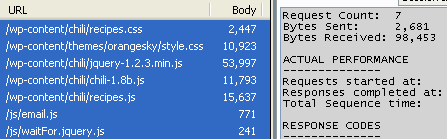 |
|---|---|
| After |  |
The stats above are from a brief walkthrough which shows how easy it is to set up Minify on an existing site. It eliminated 5 HTTP requests and reduced JS/CSS bandwidth by 70%.
Relative URLs in CSS files are rewritten to compensate for being served from a different directory.
Version 3 allows serving files directly from the filesystem for much better performance. We encourage you to try this feature.
Post to the Google Group.
See the install guide.
(Using 2.x? Here are the 2.x docs.)
See the user guide.
Minify also comes with a URI Builder application that can help you write URLs for use with Minify or configure groups of files.
See the cookbook for more advanced options for minification.
More docs are available.
- Install dev deps via Composer:
composer install composer testorphpunit
- Minify is designed for efficiency, but, for very high traffic sites, it will probably serve files slower than your HTTPd due to the CGI overhead of PHP. See the FAQ and CookBook for more info.
- If you combine a lot of CSS, watch out for IE's 4096 selectors-per-file limit, affects IE 6 through 9.
- Minify should work fine with files encoded in UTF-8 or other 8-bit encodings like ISO 8859/Windows-1252. By default Minify appends ";charset=utf-8" to the Content-Type headers it sends.
Minify was inspired by jscsscomp by Maxim Martynyuk and by the article Supercharged JavaScript by Patrick Hunlock.
The JSMin library used for JavaScript minification was originally written by Douglas Crockford and was ported to PHP by Ryan Grove specifically for use in Minify.


