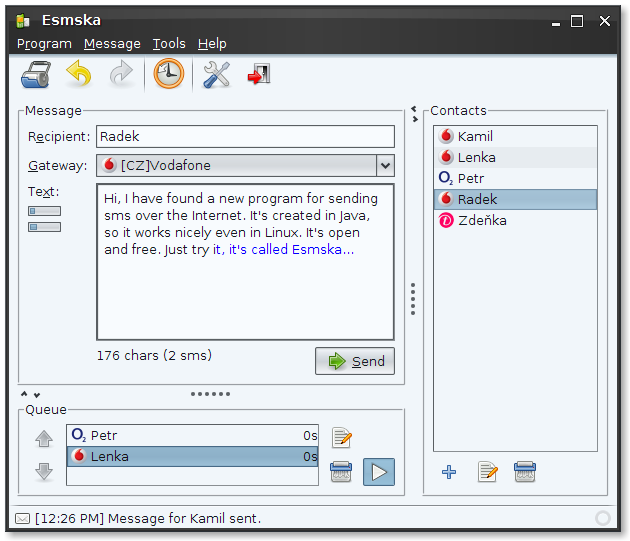
 Esmska is a program for sending SMS over the Internet using one of many
supported gateways.
Esmska is a program for sending SMS over the Internet using one of many
supported gateways.

I do no longer have time to develop nor maintain this project. Please fork my repository and develop the patches in your space. If your version becomes significantly improved over this original version, feel free to contact me and I'll happily forward visitors to your version.
- Project page: https://github.com/kparal/esmska
- Downloads: https://github.com/kparal/esmska/wiki/Download
- Documentation: https://github.com/kparal/esmska/wiki
- Translations: https://translations.launchpad.net/esmska
- Old forums: https://answers.launchpad.net/esmska
- Old project page: http://esmska.googlecode.com/
- Old announcements: https://launchpad.net/esmska/+announcements
README.md       - This file.
gateways/       - Script files for using operator gateways.
include/        - Files included in the binary distribution.
installjammer/  - Configuration files for InstallJammer.
launch4j/       - Configuration files for Launch4J.
lib/            - Program compilation and runtime libraries.
nbproject/      - Project files for the NetBeans IDE.
po/             - Localization files.
resources/      - Various resource files.
scripts/        - Various scripts for managing building process.
src/            - Program sources.
packaging/      - Files related to Linux packaging and OpenSUSE Build Service.
Program license is GNU AGPL v3+, see include/license/ for more details.
Project root directory can be opened by NetBeans IDE as its project.
Check out Esmska repository:
$ git clone git://github.com/kparal/esmska.git
By default you'll see the main development branch ('master'). You can switch to any other branch or tagged version by using:
$ git branch               # lists all branches
$ git tag                  # lists all tags
$ git checkout BRANCH|TAG
- Java 6 JDK (Sun tested)
- Ant
- in Ubuntu packaged as
ant
- in Ubuntu packaged as
Provided by lib/ directory:
- CopyLibs
- included in NetBeans IDE 7.0
- Mac UI
- included in Apple Java
- optional: see compiling section for information how to build without Mac OS support
- AppBundler
- https://java.net/projects/appbundler
- optional: see compiling section for information how to build without Mac OS support
- all runtime requirements
- Java 6 JRE (Sun and OpenJDK tested)
Provided by lib/ directory:
- Android vCard 1.2: http://code.google.com/p/android-vcard/
- Apache Commons BeanUtils 1.8.3: http://commons.apache.org/beanutils/
- Apache Commons CLI 1.2: http://commons.apache.org/cli/
- Apache Commons Codec 1.3: http://commons.apache.org/codec/
- Apache Commons Collections 3.2.1: http://commons.apache.org/collections/
- Apache Commons HttpClient 3.1: http://hc.apache.org/httpclient-3.x/
- Apache Commons IO 1.4: http://commons.apache.org/io/
- Apache Commons Lang 2.6: http://commons.apache.org/lang/
- Apache Commons Logging 1.1.1: http://commons.apache.org/logging/
- Beans Binding 1.2.1: https://beansbinding.dev.java.net/
- EZMorph 1.0.6: http://ezmorph.sourceforge.net/
- JavaCSV 2.0: https://sourceforge.net/projects/javacsv/
- Javascript Engine: https://scripting.dev.java.net/
js-engine.jar
- JGoodies Looks 2.1.4: http://www.jgoodies.com/freeware/looks/
- JSON-lib 2.4-jdk15: http://json-lib.sourceforge.net/
- Mozilla Rhino 1.7R1: http://www.mozilla.org/rhino/
- OpenIDE libraries: http://platform.netbeans.org/
org-openide-awt.jarorg-openide-util.jar- included in NetBeans IDE 6.1
- Substance 6.1: https://substance.dev.java.net/
- Substance Extras 6.0: https://substance-extras.dev.java.net/
- Substance SwingX 6.0: https://substance-swingx.dev.java.net/
- Trident 1.3: http://kenai.com/projects/trident/
If you wish to use other libraries than the ones provided in lib/ directory
(e.g. package maintainers may want this) you can specify classpaths to
individual libraries in file lib/nblibraries.properties. Variables ending
with .classpath will be of interest to you.
In sources root directory (where build.xml is located) run this command:
$ ant clean jar
If you want to build the program without Mac OS support (for example Linux package maintainers not willing to use Apple library), use command:
$ ant -DnoMac=true clean jar
All the sources should be compiled in the build/ directory. In the dist/
directory the resulting esmska.jar should be created, together with all needed
libraries, available gateways and some additional files copied from include/
directory.
After compiling you can run Esmska by command:
$ ./dist/esmska.sh
or
$ ant run
from the sources root directory.
You can run command:
$ ./scripts/create-package VERSION
to obtain binary program packages (multiplatform and Windows) inside the program root directory.
Mac packages can be created only on Mac OS by running this command:
$ ant -f build-mac.xml
When creating custom packages it may be good to note that the only important
files for the program are esmska.jar, esmska.conf, lib/ and gateways/
directory. All other files are intended only for the end-user and the program
does not use them.
Package maintainer should be interested in resources/ directory. It contains
many files useful for making packages. Especially an always up-to-date
esmska.desktop file should be used, because it contains localized menu item
translations.
You should also see the esmska.conf file, which is a system-wide configuration
file. You can set some default configuration there (like turning off update
notification for example, when you are distributing program through linux
repositories).
Program uses src/esmska/resources/l10n*.properties files for localization.
There are gettext files in the po/ directory for simplifying user contributions.
By running command:
$ ./scripts/update-translations
a new po/esmska.pot template is generated, all PO message catalogs are updated
and localized properties files are generated from them.