Website: https://github.com/eiskaltdcpp/eiskaltdcpp
Sources: https://github.com/eiskaltdcpp/eiskaltdcpp
Public chat room: https://gitter.im/eiskaltdcpp/eiskaltdcpp
Wiki: https://github.com/eiskaltdcpp/eiskaltdcpp/wiki
This program is licensed under the GNU General Public License. See the COPYING file for more information.
EiskaltDC++ is a cross-platform program that uses the Direct Connect (DC aka NMDC) and Advanced Direct Connect (ADC) protocols. It is compatible with DC++, AirDC++, FlylinkDC++ and other DC clients. EiskaltDC++ also interoperates with all common DC hub software.
Currently supported systems (in order of decreasing importance): GNU/Linux, macOS, MS Windows, FreeBSD, Haiku and GNU/Hurd.
Currently supported features (not full list):
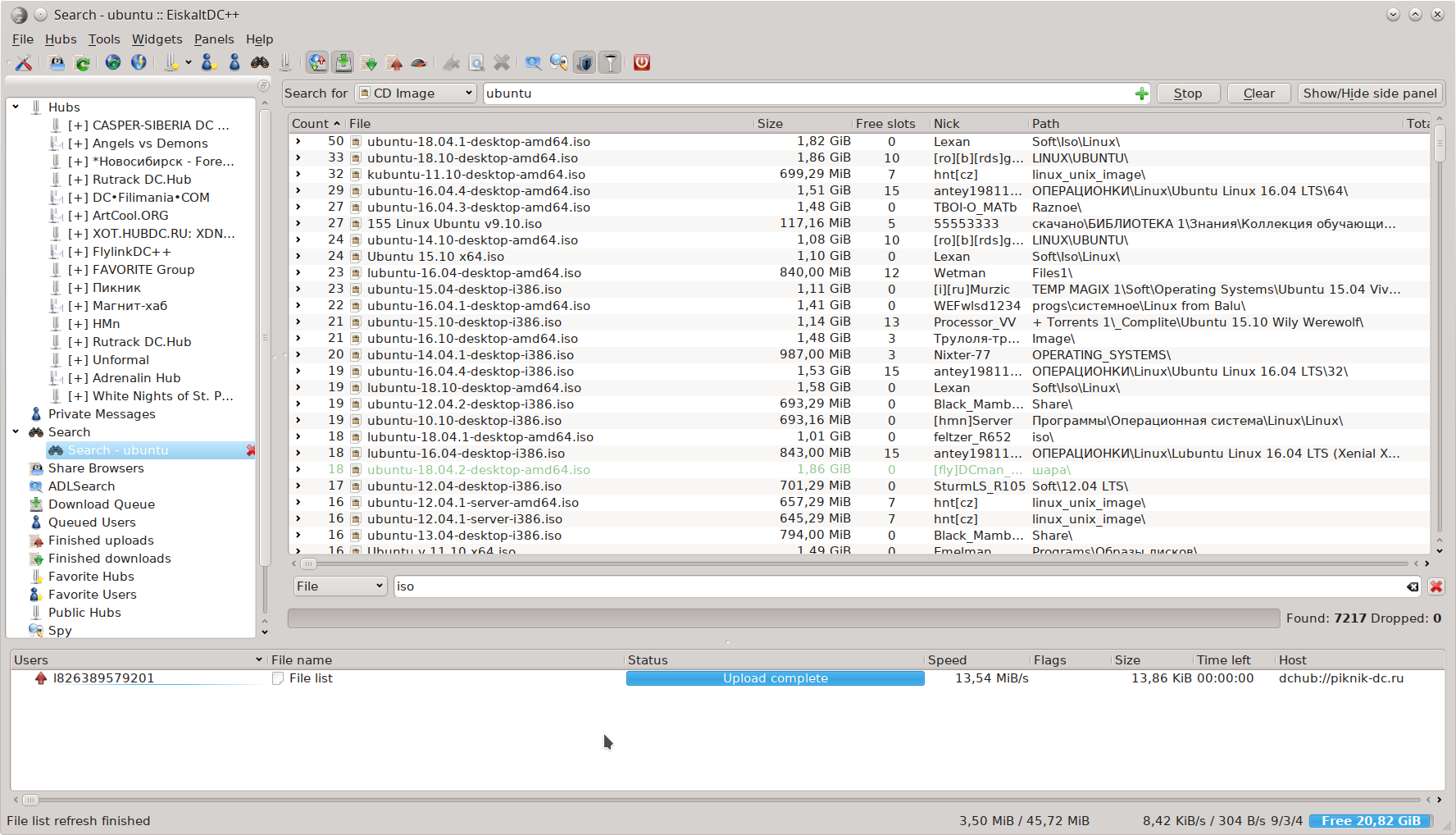
- Programs with graphical user interface (UI) on Qt (main) and GTK+ (alternative), plus daemon which may be controlled from command line or from Web UI (connected via JSON-RPC).
- Multi-threaded download (download fragments of a single file from several sources at once).
- Support of PFSR (partial file sharing): users may download parts of file from each other during file download even when no one of them do not have fully downloaded file.
- Support of DHT (allows one to search file by TTH and exchange these files without connection to any hub). Implementation of this feature is based on StrongDC++ code and compatible with all versions of StrongDC++, ApexDC++, RSX++, FlylinkDC++ and Pulse++K where this feature exists. (Some DC clients have dropped the support of this function in latest versions.)
- Support of UPnP (simplifies network connection configuration when user Wi-Fi router supports this feature).
- Support of binding to specific network interface or address (in case when user system has few network connections simultaneously).
- Support of auto updating of external IPv4 address via DynDNS services.
- Support of case-sensitive file lists. This feature is extremely important on all supported systems except MS Windows (in fact even NTFS supports case-sensitive file names, but MS Windows does not use this feature.).
- User interface is translated to many languages.
- GUI programs allow to place list of widgets on sidebar, on multiline tabbar panel or on single-line tabbar.
- GUI program based on Qt has support of hiding the program menu (it will be available by special button to the toolbar).
- Advanced search with the ability to group results; black list for search results.
- Lists of downloaded and uploaded files; ability to save logs of downloads.
- Lists of public and favorite hubs. Public hubs lists have multiple sources; favorite hubs are extremely flexible in configuration features.
- Lists of favorite users (they will receive extra slot for downloading files, etc.).
- List of active transfers (downloads/uploads), including the queue of users waiting for the slot (user may temporary grant extra slot for them).
- Flexible settings for downloading files (lists of destination directories, directory for incomplete downloads, limitation of number of simultaneous downloads, compressed transfers, check of check sums, etc.).
- Indicator of free space on disk where main downloads directory is located.
- Support of IP filter and basic antispam.
- Search spy (allows one to see search phrases which send other users, but without identifying users of course).
- ADL search with support for Perl-style regular expressions (using PCRE library).
- Flexible filter (with regular expressions support) in users list, search results, public hubs lists, file lists, etc.. (Use ##<regexp> string and read about Qt QRegExp syntax.)
- Full-featured chat (different fonts, nick coloring, parsing of magnet links and other links, emoticons, chat search, chat commands, BBCode support, disable/enable/clear chat, spell check (Aspell is used), keywords highlighting in the chat, separator for unread messages, saving of chat logs, the ability to display IP addresses and countries of users in the chat (depends on hub settings: some of them hide this data for usual users).
- User commands on hub.
- Secretary (allows you do not read tons of useless messages in many chats to find something interesting, for example, messages with magnet links or with keywords).
- Flexible keyboard shortcuts settings.
- Text and sound notifications for different events.
- Highlighting of duplicates in shared files.
- Flexible settings for files hashing (speed of hashing, filters for ignoring files, etc.).
- Indicator of hashing progress in program status bar.
- Special tool for calculating of TTH for any file (without necessity to share this file) and preparing magnet link or web maget link for it.
- Support of limitations of download/upload speed (permanent or by timetable).
- Support of limitations by size of shared files. (Yes, this is questionable feature, but it is highly demanded by users.)
- Support of handling of magnet links, web magnet links and hub links transferred via command line from other programs (for example from web browsers).
- Support of files drag-and-drop into field for entering messages (if file is present in user file list, magnet link to it will be added).
- Support of automatic replies to private messages in case of user absent.
- Support of user extensions on QtScript (only in Qt based GUI in GNU/Linux) and on Lua (in all supported systems).
- Support of IDN2 (recognition of national domain names).
- Support of URL encoded strings for hub addresses.
- Support of traffic encryption.
See ChangeLog.txt file.
For build from sources see INSTALL file.
GNU/Linux and FreeBSD users may install packages from official and unofficial repositories, ports, etc.
macOS users may install and update official builds using Homebrew cask:
brew install --cask eiskaltdcpp
or download app bundles from SourceForge and install them manually. Program doesn't have embedded mechanism of updates, so in this case users should monitor updates themselves.
Haiku users may install official package from HaikuPorts:
pkgman install eiskaltdcpp
MS Windows users may download official installers and portable builds from SourceForge. Program doesn't have embedded mechanism of updates, so users should monitor updates themselves.
EiskaltDC++ is designed mostly for experienced users who know how DC works, which settings should be used with their type of network connection, etc.. This short introduction is not intended to describe such basic things.
Here are small recommendations for initial configuration after first launch of program:
- Open Preferences dialog and set nickname (it is important!), default encoding for DC hubs (for example, WINDOWS-1251 for Russian hubs), type of incoming connections (active mode, firewall with UPnP or passive mode) and downloads directory.
- Open Public Hubs widget and connect to few popular public hubs (you may sort list by amount of users or by total amount of shared data).
- Open Search widget and try to search any popular file. (Do not forget to use spaces as words separator.)
- Add few hubs to list of Favourite hubs and enable auto connection to hubs during program startup.
- Program settings will be saved on program exit.
All programs from EiskaltDC++ project (eiskaltdcpp-qt, eiskaltdcpp-gtk and eiskaltdcpp-daemon) use the same common settings. So once you have correctly configured connections in EiskaltDC++ Qt, for example, you may launch eiskaltdcpp-daemon and use Web UI for ruling it (search files, add them to downloads queue, etc.).
During the development EiskaltDC++ in past years we have used different CVS (Subversion first and then Git) and different development models. Currently the process looks like this:
- All development of is done in git
workbranch or special (feature) branches detached fromworkbranch. - Changelog file should be updated together with changes in source code. It may be done in a same git commit or in a separate git commit depending on situation. Just use common sense for this. (There were no rule of updating change log in the past which leads to significant delaying of stable releases.)
- Once the changes from
workbranch are ready for usage and build of program is tested for most important systems (Linux, macOS, Windows) they may be merged tomasterbranch. - Daily builds of program for testers, active users and just curious people should be done from git
masterbranch. - Version scheme for builds from git snapshots should look like:
<major>.<minor>.<patch>-<commits>-g<hash>(where<major>,<minor>and<patch>are not digits but numbers).<major>.<minor>.<patch>is last git tag (for stable release),<commits>– the number of commits since last git tag and<hash>– short hash of current git commit. - Once there is noticeable amount of changes since last stable release or if there are very important bug fixes which should be quickly delivered to users new git tag (
v<major>.<minor>.<patch>) is created and tarballs with sources are uploaded to SourceForge. - In case of noticeable changes in Core of program (library libeiskaltdcpp) the
<minor>or<major>part of program version should be changed. - In case of significant changes (for example, total code refactoring) in any part of program the
<minor>or<major>part of program version should be changed. - In case when where are very few changes since last stable release, but they are important and should be quickly delivered to users the
<patch>part of program version should be changed. - There are no limits for changes suitable for a new
<patch>releases if they do not affect Core of program: they may contain new features and noticeable changes in any part of GUI.
During development all changes are tested on Continuous Integration services Travis CI and Sibuserv CI.
- Main developers of EiskaltDC++ are listed in AUTHORS file.
- Program contains source code from other free and and open-source projects. All copyright information from them is pedantically documented in special file.
- Part of program with GTK+ UI contains additional Credits.txt file. (This is just a list of contributors from LinuxDC++ and FreeDC++ projects, not all of them are copyright holders.)
There are a lot of people who were involved into EiskaltDC++ development. Some of them are listed in license headers in source files, some of them might be found only in the history of commits in our git repository. Also there are translators, testers and just active users. We are thankful to all them!
If you found a bug please report about it in our Bug Tracker.
You may use daily builds of program or program compiled from sources by yourself (from git master branch) for testing and suggesting of new features, and for reporting about new bugs (if they happen).
We like constructive comments and wishes to functions of program. You may contact with us in public chat room for discussing of your ideas. Some of them will be drawn up as feature requests in our Bug Tracker.
The work of translators is quite routine and boring. People who do it usually lose interests and their translations become incomplete. If you see such situation for translation to your native language, please join to our translations team. It is extremely welcome!
Some useful notes about translation process you may find at special wiki page.
There are many ways to contribute to the EiskaltDC++ project, if you think you can do a better job with any of the EiskaltDC++ graphics, then go right ahead!
Patches are welcome! Contact to EiskaltDC++ developers if you are working on them.
Currently we have active package maintainers for Debian and Ubuntu distros, for macOS and MS Windows. If you have suggestions about improving of packaging, just contact with them.
If you want to prepare personal builds of EiskaltDC++ for MS Windows and macOS systems, it is very welcome! We may add links to them into our documentation. Becoming an official maintainer for these systems is more complicated, but also possible.
For other GNU/Linux and *BSD systems the situation is quite clear: just update packages (pkgbuilds, ebuild, etc.) in official repositories of your favorite distributions or make a Personal Package Archive (PPA) with them. We will add links to them into our documentation.
We do not accept donations for EiskaltDC++ project as a whole, because there are no expenditures for infrastructure and such like. (Thanks to owners of GitHub, SourceForge, Transifex and Travis CI services for their support of FOSS projects!)
But you may send donations to project contributors (developers, maintainers, translators, etc.) on personal basis. Just contact with them using the contact information from AUTHORS file.
- Official PPA for Ubuntu and distros based on it (stable releases)
- Official PPA for Ubuntu and distros based on it (daily builds)
- Official Snap packages for Ubuntu and other distros (daily builds)
- Official builds for Windows
- Official builds for macOS
- Official builds for Linux
- Official packages in Debian
- Official packages in Ubuntu
- Official packages in Fedora
- Official packages in Gentoo Linux
- Official packages in ALT Linux
- Official packages in Haiku
- Official packages in FreeBSD
- Packages for openSUSE (official and unofficial)
- Packages for Arch Linux (in AUR)
- Packages for different Linux distros (the best aggregator of links)
- Packages for different Linux distros (alternative aggregator of links)
- Unofficial PPA for Debian and Ubuntu (maintained by Alex_P)
- MacPorts (macOS 10.5+)
- Project statistics on GitHub
- Project statistics on OpenHub
- Project FreeDC++ (was basis of eiskaltdcpp-gtk) (sources)
- Official Web UI for eiskaltdcpp-daemon (sources)
- Alternative Web UI for eiskaltdcpp-daemon (sources)
- Old screenshots (in English)
- Old screenshots (in Russian)
- Old notes about EiskaltDC++ (in Russian)
- Old notes about FreeDC++ (in Russian)
- Old FAQ about EiskaltDC++ (in Russian)
- Setting up interception of magnet links from web browsers (in Russian)
- Review of DC clients for Linux (in Russian)
- DC++ and programs based on it at Wikipedia (in English)
- DC++ and programs based on it at Wikipedia (in Russian)
- Valknut and programs based on it at Wikipedia (in English)
- EiskaltDC++ at Wikipedia (in Russian)
Have fun!


